Integrating Glass Onion
When building an object identifier sync pipeline, there are a bunch of other tasks that you may need to do that Glass Onion does not provide support for: deduplication, false positive detection, etc. Provided below is an abridged and generalized version of the data pipeline that powers our (US Soccer) unified data schema. This is not meant to be the canonical implementation pathway -- just an example based on our environment and needs. Please let us know if you see ways in which we can improve this document (and therefore our implementation)!
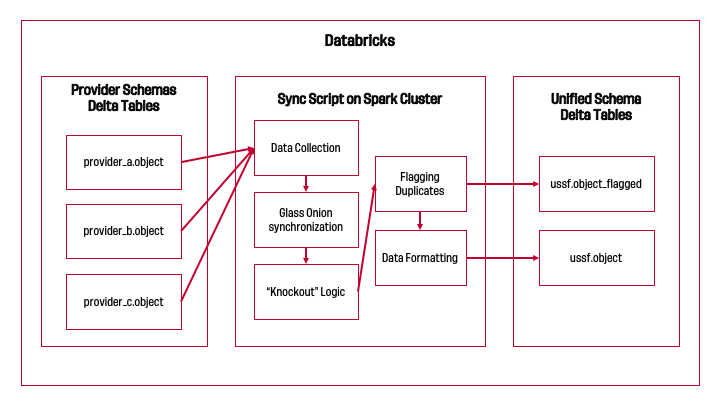
In general, our process looks something like this for every object type:
In our pipeline, each object type depends on a "higher-order" object type to have unified identifiers in order to reduce the search space of potential matches (more details in Step 2). Data providers modify competitions and seasons least often, so we synchronize those by hand. That manual work allows us to automate the synchronization process for teams, which unlocks that process for matches, which then unlocks that process for players.
Start: Provider-specific object tables
Our goal with this pipeline should be to take an object's provider-specific tables and generate one "source of truth" table for that object with identifiers we can use across our systems. To achieve that vision, this final table must meet a few different criteria:
- Does not include duplicate rows or duplicate identifiers
- Contains the most accurate metadata for a given object
- Object identifiers are durable and unique so that they can be used reliably across our systems
Step 1: Data Collection
We collect data from the provider-specific tables into a single Spark DataFrame with the schema: - data_provider: the data provider's name - provider_object_id: the ID of the object in the data provider's system - Any object-specific columns to use for synchronization - A grouping key (More on this in Step 2)
Here's what this might look like in code for player synchronization:
Step 2: Glass Onion synchronization
Stuffing all of our data into a common schema is a architectural choice forced by PySpark's GroupedData.applyInPandas(func, schema) to parallelize the work of identifier synchronization across a Spark cluster's nodes. This choice also has the benefit of naturally reducing the search space for synchronization if we have unified identifiers for higher-order objects. For matches and teams, we group by internal identifiers for competition and season, and for players, we group by an internal match identifier.
To use GroupedData.applyInPandas(func, schema) properly, we predefine a target schema (schema) and wrap SyncEngine.synchronize a function (func) to produce that schema consistently. If given providers A to C, our target schema looks something like this:
func will receive a pandas.DataFrame that contains a subset of our big object table without the grouping key added, so we need to do three things:
- Transform this subset into a list of
SyncableContentinstances - Run those instances through
SyncEngine - Format
SyncEngine's result into the target schema.
Thus, func ends up looking something like this:
With these prerequisites in place, we can actually run GroupedData.applyInPandas(func, schema):
Step 3: "Knockout" Logic
Once we have a preliminary set of synchronized identifiers (the "preliminary set" below), we can run them through our "knockout logic". First, we retrieve the list of existing synchronized identifiers from ussf.object and store it in a temporary dataframe (our "knockout list").
Then, for each data provider (say, Provider A) in the list:
- Rows with instances of existing non-null identifiers for Provider A from the "knockout list" are removed from the "preliminary set" (IE: they are "knocked out").
- We group the set of remaining synchronized identifiers by Provider A's identifiers.
- In each group, we find the first non-null identifier for every other data provider (say, B through Z). However, if we find multiple identifiers in a group for, say, Provider B, we set provider B's identifier to NULL instead.
- The rows aggregated for Provider A from this grouping process are added to the "knockout list".
- This process repeats until we exhaust the list of data providers or there are no more rows in the "preliminary set".
Here's what this looks like in code:
Utility functions used above
One quirk of our implementation: we store the "preliminary set" and "knockout list" in Delta tables. Why? While developing our data pipeline, we saw that using MERGE INTO was orders of magnitude faster than pulling a list of identifiers into a Spark filter() statement when the tables are massive (100k+ rows).
Step 4: Flagging Duplicates
Our "knockout logic" effectively ignores the existence of duplicates in the "knockout list". We identify these by counting the number of times a given provider's identifier appears in the "knockout list". If an identifier appears more than once, we flag those rows and then set them aside in a object_flagged table for manual review.
In code:
Step 5: Data Formatting
Now that we have flagged duplicate rows, we can prepare the "knockout list" to be written to the table in our unified schema for this object. This has three stages:
- Removing any duplicate rows (including those we have flagged before this pipeline run)
- Joining our list back to provide-specific tables for object metadata
- Setting object metadata fields based on provider priority
- Assigning a unique and durable identifier for the object
The first two are easy:
dataframe.filter()orMERGE INTOtake care of removing rows with duplicate identifiers.dataframe.join()on a provider identifier brings in data from the provider-specific table.
But the next task poses a philosophical question: if our table for this object is supposed to be a source of truth for this object across all systems, how do we know which data provider is "true"? How do we know which fields they are "true" for? We have to come up with some prioritization strategy for each field in order to properly take object metadata from the "truest" sources first. For example, let's say we have Providers A, B, and C for player data:
- Provider A might be really accurate with birth dates but prefer legal/official names over commonly used names
- Provider B might have common names/mononyms, but have spotty accuracy on birth dates.
- Provider C is ok on names and birth dates, but is extremely accurate with country of birth / national team affiliation.
We might structure our data formatting like so:
This brings us to our final formatting step: building durable, unique identifiers for each object row. There are a number of different ways to do this (GUID, UUID, ULID, auto-increment ints, etc), but we chose to build our own identifier using the object metadata. In the case of players, we used:
- the player's gender
- a normalized version of the player's name, cut to 10 characters (the "prefix")
- the instance of the prefix for that gender in the table: 1, 2, 3, etc. (the "index")
Given a player named "test player" whose "prefix" only appears once in our dataset, results in an identifier that looks something like: female-testplayer-1.
There's one quirk with this: when using a Window, Spark forces you to sort that window. In our player pipeline, we sort this window by player name. This can result in new player rows that are sorted ahead of existing player rows, which throws off the "index" like below:
| Player ID | Player Name | Prefix | Gender | Index |
|---|---|---|---|---|
female-testplayer-1 |
Test Player A | testplayer |
female | 1 |
NULL |
Test Player B | testplayer |
female | 2 |
female-testplayer-2 |
Test Player C | testplayer |
female | 3 |
This could also come up if player rows have ever been deleted from the table. This edge case breaks our two identifier tenets:
- Not durable: if we choose to update all identifiers when new rows appear, these identifiers become unreliable in downstream analyses.
| Player ID (Old) | Player Name | Prefix | Gender | Index | Player ID (New) |
|---|---|---|---|---|---|
female-testplayer-1 |
Test Player A | testplayer |
female | 1 | female-testplayer-1 |
NULL |
Test Player B | testplayer |
female | 2 | female-testplayer-2 |
female-testplayer-2 |
Test Player C | testplayer |
female | 3 | female-testplayer-3 |
- Not unique: if we instead keep existing identifers and only fill in identifiers where they don't exist, we'd end up with duplicate identifiers.
| Player ID (Old) | Player Name | Prefix | Gender | Index | Player ID (New) |
|---|---|---|---|---|---|
female-testplayer-1 |
Test Player A | testplayer |
female | 1 | female-testplayer-1 |
NULL |
Test Player B | testplayer |
female | 2 | female-testplayer-2 |
female-testplayer-2 |
Test Player C | testplayer |
female | 3 | female-testplayer-2 |
We must develop a more complex rule to generate new indices for a given prefix and gender. Here's what we've found to work:
- For all rows with existing identifiers, extract the index.
- Determine the maximum existing index value.
- Start counting new indices from this maximum value.
Here's what our example table would look like if we apply this strategy:
| Player ID (Old) | Player Name | Prefix | Gender | Index (Old) | Index (New) | Player ID (New) |
|---|---|---|---|---|---|---|
female-testplayer-1 |
Test Player A | testplayer |
female | 1 | 1 | female-testplayer-1 |
NULL |
Test Player B | testplayer |
female | 2 | 3 | female-testplayer-3 |
female-testplayer-2 |
Test Player C | testplayer |
female | 3 | 2 | female-testplayer-2 |
Here's what this looks like in code:
Final: unified object table
With our pipeline generating a "knockout list" that meets our target criteria:
- Does not include duplicate rows or identifiers
- Includes most accurate metadata for the object from the data provider that tends to be the most accurate for each metadata field
- Assigns objects unique and durable identifiers
We can simply execute a MERGE INTO statement into the table for this object in our unified schema:
And just like that: we're done with our pipeline!